

When creating a Facebook page, four tabs appear by default: photos, videos, events and likes; But numerous Facebook Page templates are also offered for business pages with other personalized tabs for each type of business, mostly due to Facebook’s commitment to e-Commerce.
To apply one of these templates, the option is located at the top right of your Facebook page, in Settings, and within this, in the bar on the left, Edit Page, where you can configure the actions and tabs of your page, choose a template with default tabs and buttons, as well as change and configure the tabs you want manually.
The tabs currently available are:
- Home, the destination space for your Facebook page.
- Posts, where all your posts are displayed.
- Opinions, where it shows people’s opinions and allows you to write new ones.
- Photos, which contains the photos you have uploaded to your page.
- Store, which shows the products you want to highlight.
- Offers, where your company’s current offers appear.
- Community, which contains posts from friends and public posts about your page.
- Videos, which contains the videos you have uploaded to your page.
- Events, list of upcoming events.
- Information, a description of your page.
- Jobs, list of job offers for your company.
- Ads, those that an advertiser currently has in circulation.
- Live videos, where it shows live videos on your page.
- Notes, which provides a space to highlight notes on your page.
- Services, which provides a space to highlight the services you offer.
Facebook Page Templates
The formats that Facebook offered until now to improve and promote brands are the following:
- Shopping
This template is designed to showcase products and make online shopping easier. In order from top to bottom, it contains the following tabs: Home, Posts, Reviews, Photos, Store, Offers, Community, Videos, Events, Information, Jobs and Announcements.
- Company
This template is designed to help you manage your business, including the option to post job openings and special offers. The tabs it contains are: Home, Publications, Opinions, Videos, Photos, Information, Community, Offers, Jobs and Announcements.
- Performance halls
Designed to highlight useful information such as the venue’s hours, location, and upcoming events, this template includes the following tabs: Home, Events, Reviews, Info, Videos, Photos, Posts, Jobs, Community, and Announcements.
- Restaurants and cafes
Designed to highlight photos and important information about the menu, hours and location, it includes tabs for: Home, Offers, Reviews, Photos, Posts, Videos, Events, Information, Community, Jobs and Announcements.
- Politicians
This template is specially designed to help politicians reach the people who support them and convey their message, and includes the tabs of: Home, Information, Videos, Posts, Events, Notes, Photos, Community and Announcements.
- Movies
Designed to highlight show times for your audience, it includes the following tabs: Home, Posts, Reviews, Videos, Photos, Information, Community and Announcements.
- Non-profit organization
This template is specially designed to highlight your cause, encourage people to raise funds and donate to your organization. It contains the following tabs: Home, Information, Events, Photos, Videos, Community, Opinions, Jobs, Posts and Announcements.
- Video Page
Specially designed to display content in video format on your page, it includes the following tabs: Home, Information, Publications, Videos, Photos, Community and Announcements.
- Services
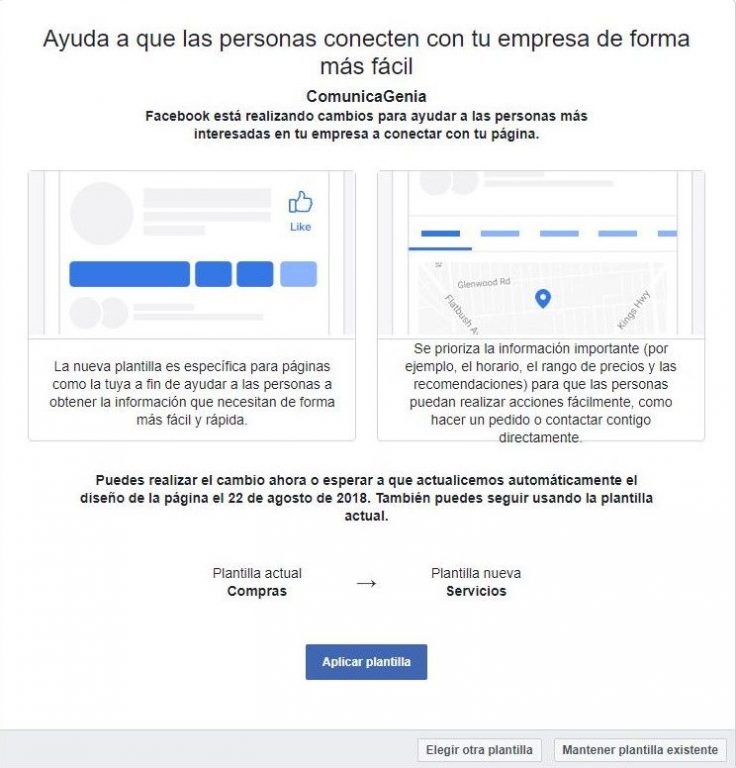
This is the new template that Facebook has launched, designed to help people find your services and contact you, helping users get the information they need easier and faster, as it prioritizes important information, such as hours or recommendations. Includes the following tabs: Home, Services, Reviews, Store, Offers, Photos, Videos, Publications, Events, Information, Community, Jobs and Announcements.
This new template will be automatically updated on August 22, 2018, from which date you can decide whether to keep the current template or try the new Services template launched by Facebook. And if, despite all the previous Facebook Page template options, none of them convince you, you always have the option of sticking with the standard model, although it would be advisable to assess the strengths and weaknesses of your business to try to take advantage of the functionalities offered by this social network.
Did you like this article? Rate it!
More related articles
This post is also available in: