
Audiovisual content is the undisputed king of communication today. Whether to promote a product or transmit knowledge, videos have become essential in our daily lives.
However, for many, creating videos can seem overwhelming. This is where FlexClip comes in, a platform that seeks to democratize video production, being accessible to all levels of experience.
This tool simplifies the video creation process and gives you all the tools you need to make and edit videos professionally. But is FlexClip the platform you need to create your videos?
Learn in detail what FlexClip is, its main features, how it works and why it is a great option for content creators, businesses and marketing professionals around the world.
What is FlexClip?
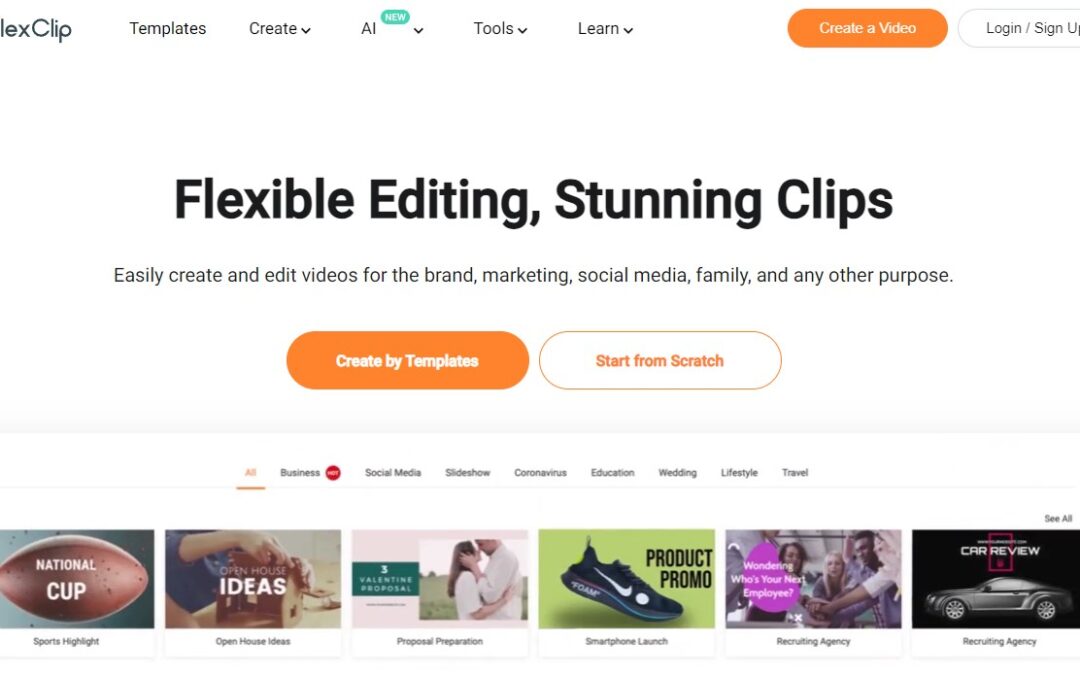
FlexClip is an online platform that allows you to create and edit videos simply and professionally, without the need to download any additional software.
Essentially, FlexClip works as an all-in-one video creator, giving you intuitive tools and a wide variety of features to simplify video production.
This platform is distinguished by its accessibility and ease of use, which makes it ideal for both beginners and experienced users in creating audiovisual content.
With FlexClip, you can create all the videos you need, from business promotions and educational presentations, to social media videos and much more.
One of the features of FlexClip is its library of multimedia resources, which includes copyright-free videos, images and music, all so you can access quality content for your projects and not worry about copyright problems.
Additionally, FlexClip offers pre-designed templates that make it easy to create professional videos with just a few clicks.
How does FlexClip work?
FlexClip is an online platform that gives you a set of intuitive tools for creating and editing videos. The overall process of using FlexClip can be broken down into several simple steps.
First, you need to register for free and log in. Once inside the platform, you can start by creating a new project, for which you must choose the aspect ratio of the video and give the project a name.
After creating the project, you can import the media that you will use in your video. FlexClip allows you to upload your own videos, images and audio files, or select assets from the media library, free of copyright.
Once you import the media, you can start editing videos. This includes actions such as cutting and trimming clips, adding transitions between them, overlaying text or graphic elements, adjusting speed, and adding special effects.
When you finish editing your video, you have the option to preview it to make sure it looks and sounds the way you want. If necessary, you can make final adjustments to the duration, position of elements and other details.
Once you are satisfied with the final result, you can export the video in the format and resolution you want. FlexClip offers export options with different resolutions and file formats, to adapt to the specific needs of each user.
Who can use FlexClip?
FlexClip is designed to be used by a wide variety of users, from those with little experience creating videos to professionals in the audiovisual field:
- Social media content creators: Those who want to share visual content on platforms such as Instagram, Facebook, YouTube, TikTok and more can find FlexClip a useful tool for creating engaging videos.
- Entrepreneurs and small business owners: FlexClip offers an affordable way to create promotional videos, advertisements and marketing content, allowing entrepreneurs and small business owners to increase their online visibility.
- Marketers: Marketers can use FlexClip to create advertising campaigns, product demo videos, tutorials, and other content that helps promote brands and products effectively.
- Educators and trainers: Teachers, coaches and trainers can use FlexClip to create educational materials, presentations and online tutorials for their students and audiences.
- Multimedia content creators: Graphic designers, video editors and other professionals in the multimedia field can use FlexClip as an additional tool to create visual content for their projects and clients.
FlexClip Features
FlexClip offers a wide range of features and tools that make creating and editing videos easy:
Intuitive interface
FlexClip features an intuitive and easy-to-use user interface, designed for both beginners and experienced users to navigate the platform without difficulty. Features are organized logically, making them easy to access and use.
Media Library
The platform has an extensive media library that includes a variety of royalty-free videos, images, and music. This library allows you to access high-quality content so you can enrich your projects without worrying about copyright issues.
Pre-designed templates
FlexClip has a large selection of pre-designed templates for a variety of purposes, including ads, presentations, promotional videos, and social media content.
These templates allow you to create professional videos, with customization options to adapt to the needs of each user.
Video editing
The platform has video editing tools, which help you perform a variety of actions, such as cutting, trimming, merging and adjusting video clips.
Additionally, you have the option to add smooth transitions between clips, custom text, visual effects, and background music to create dynamic and engaging videos.
Personalization
With FlexClip you can customize your videos with custom text, logos, colors and other graphic elements. This helps you reflect the identity of a brand or project in a unique way and create videos that stand out online.
Video export
Once the video is complete, you can export it in different formats and resolutions, including HD (high definition). With this you can adapt your videos according to the different social media platforms, websites or devices.
Cross-platform compatibility
FlexClip is a web-based platform, meaning you can access it from any device with an internet connection.
This includes desktops, laptops, tablets and smartphones, giving you the flexibility to create videos wherever and whenever you want.
Advantages that FlexClip offers its users
Learn about some of the key benefits that FlexClip provides its users:
- Accessibility: As a web-based platform, FlexClip is accessible from any device with an Internet connection, allowing you to create and edit videos anytime, anywhere.
- Ease of Use: FlexClip’s intuitive and easy-to-use interface makes it accessible to users of all experience levels, from beginners to professionals.
- Media Library: FlexClip has an extensive media library with royalty-free videos, images and music. This gives you access to the many resources that will enrich your projects, without worrying about copyright.
- Pre-designed templates: The platform offers a wide selection of pre-designed templates for a variety of purposes, making it easy to create professional videos with just a few clicks.
- Editing Tools: FlexClip offers video editing tools that allow users to perform a variety of actions, such as cutting, trimming, merging and adjusting video clips.
- Personalization: You can personalize your videos with text, logos, colors and other graphic elements, so that you reflect the identity of a brand or project.
- Video export: Once the video is complete, you can export it in different formats and resolutions, so you can adapt the videos to the specifications requested by social networks, websites or devices.
Direct FlexClip Competitors
Find out which FlexClip’s best-known competitors are:
Veed.io
Veed allows users to create stunning videos with just one click. It offers features like cropping, adjusting, adding subtitles and more, all online and without the need for an account. It is a quick and convenient option for those looking for a basic video editing tool.
Invideo.io
Invideo is another alternative that offers advanced features and an intuitive interface for video editing. Its advanced features may be attractive to users who need powerful tools for their video projects.
Flixier.com
Flixier stands out for its speed and ease of use. It enables real-time collaborative editing, making it ideal for teams that need to work together on video projects efficiently.
Kapwing.com
Kapwing is a versatile platform for creating and editing videos. Offers tools like cropping, overlays, subtitles, and more. Its focus on versatility makes it an attractive choice for a variety of video projects.
FlexClip plans
These are the plans that FlexClip makes available to you:
Free Plan
This plan is aimed at users who want to try out the basic functionalities of FlexClip or have sporadic video creation needs. It is ideal for those who are starting out in creating audiovisual content and want to get familiar with the platform.
Users of this plan can access templates, multimedia resources and create videos at no charge.
Basic Plan
For an affordable price of $4.99 per month, users can access additional features such as exporting HD videos and removing the FlexClip watermark.
This plan is ideal for content creators looking to improve the quality of their videos and want a watermark-free experience for more professional projects.
Plus Plan
The Plus plan is designed for users who need access to premium features and higher video export quality.
For $7.99 per month, users can enjoy all the features of the basic plan, as well as access to premium templates and the ability to export videos in Full HD quality.
This plan is suitable for more serious content creators who want additional options to improve the quality and appearance of their videos.
Business Plan
FlexClip’s Business plan is aimed at users and companies that require advanced functionalities and greater video production capacity.
Costing $19.99 per month, this plan offers features like 1080p Full HD export, no watermark, priority access to customer support, team collaboration, and access to premium templates.
It is ideal for work teams, digital marketing agencies and companies that need to produce high-quality videos on a regular and collaborative basis.
Lifetime Plan
If you prefer the lifetime or single payment version and abandon the monthly fees, we leave you the appsumo link with a 10% discount on your first purchase.
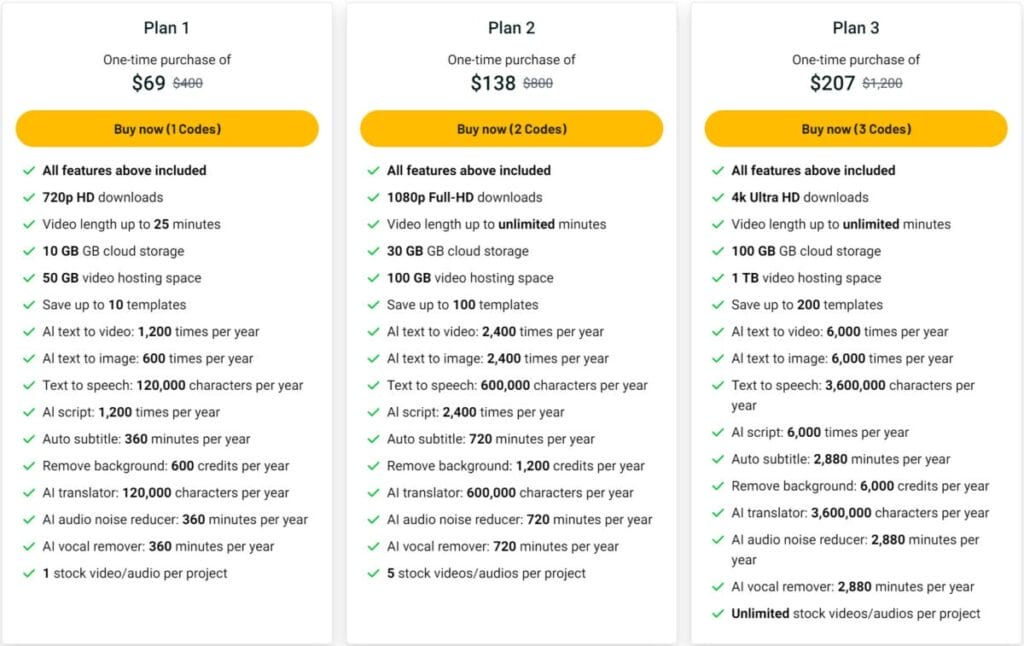
This offer is in different plans, from 69 euros in a single payment. Remember that most lifetime offers are not permanent. Some do them only once, others several times, but only few companies have this business model permanently. If it is no longer there, you can look for an alternative or wait later.
Should you use FlexClip as your video creation and editing platform?
FlexClip offers a wide range of features and tools, making creating and editing videos fast, easy and efficient for a variety of users, from beginners to professionals.
With an intuitive and easy-to-use interface, FlexClip gives you the ability to create stunning videos without prior video editing experience.
Additionally, the platform offers an extensive media library that includes royalty-free videos, images, and music, as well as pre-designed templates for a variety of purposes.
This provides users with access to a wide variety of resources that will enrich your projects, making the creation process easier. FlexClip offers various plans that adapt to the needs and budgets of different types of users.
From the free version for casual users to the Business plan for businesses that require advanced functionality, FlexClip offers options for all levels of experience and usage.
Therefore, FlexClip is an attractive option if you are looking for an easy and accessible way to create and edit videos. Its powerful features make this platform a great ally for producing any audiovisual project.
This post is also available in: