
If you are dedicated to content creation, marketing or are simply passionate about artificial intelligence, you know very well that finding the perfect music track is usually a headache.
Licenses, repetitive sound banks, tight budgets… Until now. On March 25, 2026, Google hit the table with the launch of Lyria 3 Pro.
We’re not talking about a simple robotic tone generator. This is an advanced musical collaborator who understands rhythm, arrangements and the structure of a song. **
We will show you in detail how you can make the most of this technology, which goes far beyond the simple chat window we are used to, integrating into an entire ecosystem of Google tools.
From 30 seconds to full production: The leap of Lyria 3 Pro
Let’s do a little memory. On February 18, 2026, Google DeepMind presented us with the standard version of Lyria 3. It was amazing: it allowed us to generate high-fidelity stereo audio at 48,000 Hz, with super natural voices in several languages and lyrics that, frankly, were very coherent.
However, those tracks were limited to a brief 30 seconds. Ideal for a test, but insufficient for a professional project.
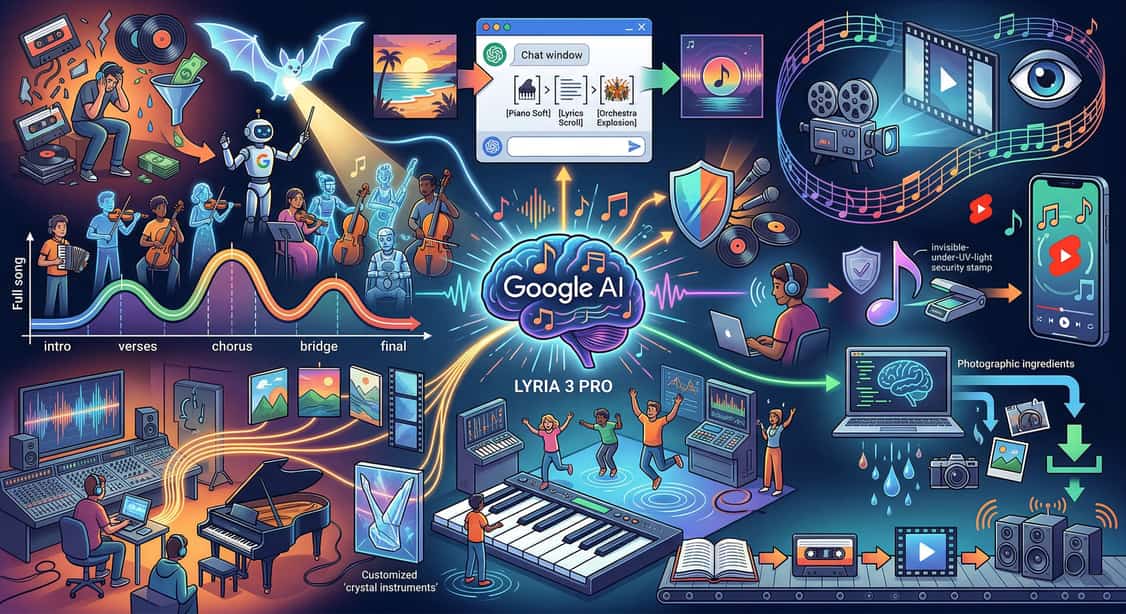
Just a month later, the arrival of Lyria 3 Pro has changed everything. The main novelty is that we can now generate complete songs up to 3 minutes long. But the real turning point is its structural awareness.
The AI model now “understands” how a song is composed from start to finish. He knows how to differentiate and naturally construct the intros, the verses, the choruses, the bridges and the final outcome.
Beyond chat: Google’s music ecosystem
We tend to think that interacting with AI is reduced to writing a text in the Gemini app. Although that is the most accessible and fastest route, the true power of Lyria 3 Pro lies in how Google has integrated it into its range of platforms.
Look at all the options we have at our disposal:
ProducerAI (The professional studio)
Google acquired this music production platform in February 2026 and it is now available in Google Labs. It is crazy for demanding musicians and creators.
Here, Lyria 3 Pro is combined with Gemini as a conversational assistant, Veo for creating video clips and generating graphic art for covers. It allows you to refine songs step by step and create completely personalized instruments.
Also, something fundamental: the user retains ownership of everything generated, even in the free plan.
Google Vids (Automatic Soundtracks)
If your daily life involves editing corporate videos or for social networks, Google’s AI video editor has incorporated Lyria 3 Pro to generate automatic soundtracks that adapt like a glove to your visual content.
Dream Track on YouTube Shorts
For quick content creators, this tool remains vital as it directly generates soundtracks for short videos on the platform.
Environments for developers and agencies
If you have a technical background or work in an agency, Google offers access to Lyria through Vertex AI, Gemini API and Google AI Studio. You can access models like lyria-3-pro-preview for full songs or lyria-3-clip-preview for 30-second tracks.
This allows you to integrate musical generation into your own applications, export in MP3 or WAV formats, obtain the texts of the lyrics and even use a maximum of 10 images as input to guide the creation.
###Music AI Sandbox
For those looking to experiment, this tool (with expanded access) allows you to explore musical ideas in real time thanks to the Lyria RealTime variant, ideal for interactive performances.
Practical guide: How to generate your first track with Gemini
If you want to start tinkering today and you are over 18 years old, the Gemini app is your gateway. If you have a paid subscription, you can take advantage of all the power of the Pro version of Lyria. The process is extremely intuitive:
- Open Gemini and think of a good prompt.
- If you are a paying user, select the “Think/Pro” model to go for the 3 minutes, or stick to the “Quick” model if you just want a quick 30-second test.
- Magic: Gemini will return the track to you with realistic voices, lyrics (generated or based on what you have requested) and even automatic cover art.
The secret is in the prompt. Since current AI does not allow iterative editing within the same generation (each attempt is a “one-shot”), you must be very specific from the beginning.
Try including structure tags like [Intro], [Verse], or [Chorus] to guide Lyria 3 Pro.
For example: »2-minute epic pop song with piano and strings. [Intro] soft piano [Verse 1] lyrics about personal improvement [Chorus] explosion of strings and choral voices…”
You can even use multimodality: upload a photograph of a sunset and ask Gemini for “Relaxing background music that captures the warmth and nostalgia of this image.”
Limitations and the future of creation
Like any emerging technology, Lyria has its limits. Results may vary slightly between different runs, and there are daily usage limits depending on your subscription.
Also, be clear that this does not replace the talent of a human musician; It is always necessary to check that the track really fits with your creative vision. On an ethical level, Google has done its homework.
The model has been trained exclusively on permissible data and actively blocks real artist voices, copyrighted lyrics and harmful content.
To guarantee transparency, absolutely all generated tracks are embedded with SynthID technology, an imperceptible watermark that allows anyone to upload the file to Gemini and verify that the audio was generated by Google’s AI.
Unlike competitors like Suno or Udio, Google’s great advantage is its native and scalable integration into a complete workflow: from text to music, from music to video, and from there to distribution.
I encourage you to enter Gemini, play with the prompts and discover how this AI can become the best ally for your next campaigns or content. See you in the comments!
This post is also available in: